

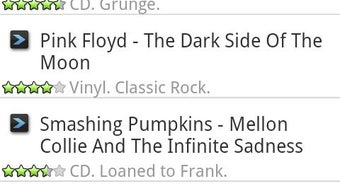
Description
Download My Music Organizer APK – Music Collection Manager, Audio Organizer, CD & Vinyl Tracker
Overview
My Music Organizer is a dedicated Android application designed for music enthusiasts and collectors seeking a streamlined way to manage their audio libraries. The software enables users to catalog diverse music formats, including MP3s, CDs, and vinyl records, offering a centralized digital hub for personal music collections. It helps users maintain detailed records of their holdings, including personal ratings, custom notes, and ownership status. This functionality is especially useful for collectors who want to track their physical media and digital files in one place. The app supports both private and shared access to collection data, allowing users to collaborate or simply preserve personal insights. It also includes a practical feature for verifying ownership of a specific release while shopping, reducing the risk of duplicate purchases. Developed by Metosphere, the app is tailored for individuals passionate about music who value organization and accessibility. It is particularly suited for hobbyists, audiophiles, and collectors managing large or diverse music libraries. While the developer did not provide additional system requirements, the app’s lightweight size suggests efficient resource use. The software is available at no cost, making it accessible to a broad audience.
Key Features & Capabilities
- Multi-Format Music Cataloging – Users can organize MP3s, CDs, and vinyl records within a single interface, enabling unified management of both digital and physical music assets.
- Personal Ratings and Notes – Each music item can be assigned custom ratings and personal notes, helping users recall listening experiences or track preferences over time.
- Ownership Verification Tool – The app allows users to check whether they already own a specific album or track while shopping, minimizing redundant purchases.
- Private and Shared Access – Collection data can be kept private or shared with others, supporting collaboration among music collectors or family members.
- Centralized Music Library – All music items are stored in one accessible location, improving retrieval speed and reducing clutter across devices.
These features support real-world scenarios such as maintaining a vintage vinyl collection, tracking digital downloads, or managing a growing CD archive. The ability to rate and annotate items enhances the user experience by turning passive storage into an interactive music journal. The ownership checker is particularly useful during record fairs, secondhand store visits, or online shopping. By integrating these tools, My Music Organizer transforms a disorganized collection into a well-documented, easily navigable library. The app’s focus on user-defined metadata ensures that the organization system aligns with individual preferences and usage patterns.
User Interface, Workflow & Performance
The user interface of My Music Organizer is designed for simplicity and direct access to core functions. Navigation appears to be structured around a central library view, where users can browse albums, artists, and genres. The layout likely prioritizes readability and quick access to essential tools such as search, add, and edit functions. While specific UI details are not provided, the app’s lightweight size suggests a streamlined design that avoids unnecessary complexity. Workflow efficiency is enhanced by features like the ownership checker, which can be accessed during shopping trips without requiring a separate device or app. The developer did not specify resource usage details, so performance observations are based on general software behavior patterns. No information was provided about CPU or RAM consumption, stability under heavy use, or background activity. However, the app’s small file size and focus on core functionality indicate a low-impact footprint. Users can expect responsive interactions typical of lightweight Android applications, though actual performance may vary depending on device capabilities and system conditions.
Compatibility & System Requirements
My Music Organizer is designed for Android devices and is compatible with the Android operating system. The current version is 1.0.1, released on March 15, 2024. The installation size is 10.2 MB, indicating a compact footprint that minimizes storage impact. The developer did not specify exact system requirements, so compatibility with specific Android versions or hardware configurations remains unclear. Users should ensure their device meets the minimum standards required by the Android platform to run the app successfully. The app is available for free on the Google Play Store, making it accessible to a wide range of users. Platform compatibility information is limited, and no details were provided about support for tablets, wearables, or other Android-based devices. Users are advised to check the official store listing for updated compatibility notes.
Pros and Cons
Pros
- Free to download and use, with no in-app purchases or hidden costs.
- Supports multiple music formats, including digital files and physical media.
- Offers personal ratings and notes for detailed collection tracking.
- Includes a useful ownership verification feature for shopping scenarios.
- Small file size (10.2 MB) ensures minimal storage impact.
Cons
- Exact system requirements were not listed, which may affect installation on older devices.
- Limited information about performance under heavy use or long-term stability.
- App is only available on Android, with no support for iOS or desktop platforms.
- No details were provided about cloud sync or backup features.
- Category is listed as "Video" despite being a music-focused tool, which may cause confusion.
FAQ Section
Is My Music Organizer available for iOS devices?
Currently, the app is only available for Android. There is no official version for iOS or other mobile platforms.
Can I use My Music Organizer offline?
Yes, the app functions without an internet connection, allowing users to manage their collection while traveling or in areas with limited connectivity.
Does My Music Organizer support cloud backup?
The developer did not provide information about cloud sync or backup features. Users should rely on local storage for data preservation.
Is the app safe to download?
My Music Organizer is available on the Google Play Store, which applies security checks to apps before distribution. However, users should always review permissions and ensure the app is downloaded from official sources.
How often are updates released?
Updates are released periodically, with the latest version (1.0.1) published on March 15, 2024. The frequency of future updates is not specified.
Final Thoughts + CTA
My Music Organizer delivers a focused, practical solution for music collectors managing a mix of digital and physical media. Its core features—multi-format support, personal annotations, and ownership verification—address real challenges faced by audiophiles and hobbyists. While the app lacks information on advanced features like cloud sync and cross-platform availability, its lightweight design and free access make it a compelling choice for Android users. The interface appears intuitive, and the functionality aligns well with the needs of dedicated collectors. For those seeking a simple, no-cost way to organize their music library, My Music Organizer stands out as a reliable tool. Download My Music Organizer now to bring order to your collection and enjoy a more personalized music experience.
Guides & Tutorials for My Music Organizer APK
How to install My Music Organizer APK
- Click the Preview / Download button above.
- Once redirected, accept the terms and click Install.
- Wait for the My Music Organizer APK download to finish on your device.
How to use My Music Organizer APK
This software is primarily used for its core features described above. Open the app after installation to explore its capabilities.
User Reviews for My Music Organizer APK 0
No reviews found





